


Just Listening: Direct QCC5181 NVRAM Acoustic Tuning Without a 400 MB App
On this page (3 sections)
A good pair of noise-canceling headphones is a small sanctuary on a train or at the workbench. The silicon inside modern QCC5181-based headsets is genuinely lovely acoustic engineering. What surrounds that hardware, unfortunately, is usually a 400 MB companion app demanding an account login, background telemetry daemons, and a coarse three-slider bass/mid/treble toy.
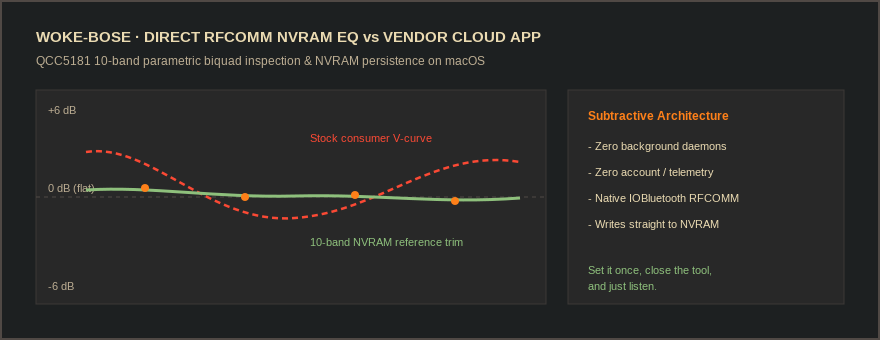
In Woke-Bose, we practiced software subtraction: talk directly to the headset's DSP registers from macOS, tame the fatiguing consumer V-curve into an honest reference balance, persist it into non-volatile memory, and then close the program completely.
Witnessing the Wire Instead of Guessing#
At first, I assumed the vendor's mobile app was only capable of three simple tone bands because that was all the UI showed. Capturing the Bluetooth RFCOMM framing (BMAP protocol) and inspecting the APPUHDR5 firmware container metadata told a much nicer story: the QCC5181 DSP actually exposes clean parametric biquad filter stages and persistent NVRAM preset slots. The hardware was never the limitation — the wrapper was just hiding it.
Two Small Bottlenecks on macOS#
1. macOS IOBluetooth RFCOMM channel lifecycle#
On modern macOS, opening an IOBluetoothRFCOMMChannel while CoreAudio is actively streaming A2DP audio can cause brief packet hiccups if you hammer status polls in a tight loop. Pacing each register frame cleanly and reading back the ACK before sending the next biquad coefficient kept audio playback completely glitch-free while tuning live by ear.
2. Taming resonance without dulling acoustic warmth#
Flatten a headphone curve too aggressively on a measurement rig and acoustic instruments suddenly sound clinical and lifeless. Spending an hour listening to plain voice recordings and solo cello while nudging Q factors taught a familiar lesson: you don't flatten every peak by force; you soften just the two harsh resonances (~160 Hz mid-bass bloom and ~6.5 kHz sibilance) so you can listen for three hours without ear fatigue.
Step-by-Step: Inspecting & Tuning on macOS#
Everything in Woke-Bose compiles cleanly with native macOS system frameworks — zero Electron, zero Node, zero cloud SDKs.
Step 1: Clone and build with strict compiler warnings#
git clone https://github.com/TinkeringDao/Woke-Bose.git
cd Woke-Bose
swift test
swift build -c release
Step 2: Inspect current DSP & NVRAM state over Bluetooth#
Pair your headphones normally in macOS Bluetooth settings, then query the current firmware container and EQ bank read-only:
.build/release/woke-bose statusStep 3: Write the warm 10-band reference curve to NVRAM#
Apply the reference parametric preset and persist it to headset NVRAM so it stays active across your phone, laptop, or bench audio source with zero background app running:
.build/release/woke-bose apply --preset warm-reference --persistWhen a guitar tuner finishes its job, it doesn't ask to run in your menu bar forever or send analytics about what song you're playing. You tune the strings, set the tuner down, and listen to the music.