


Saving a Dock From E-Waste: Hardware-Splitting DisplayPort Over macOS IOKit AUX
On this page (3 sections)
There is a particular kind of modern waste that stings an engineer's conscience: perfectly capable hardware sitting in a drawer because two vendors couldn't agree on a software flag. Plug two 1920x1080 monitors into a Lenovo ThinkPad Thunderbolt 3 Dock Gen 2 (Type 40AN) on Linux or Windows, and you get two independent desktops. Plug that exact same dock into a Mac, and macOS mirrors the same image onto both screens — because macOS still refuses to implement DisplayPort Multi-Stream Transport (DP MST) for hub-routed outputs.
Before replacing the hardware, we opened stretch-the-mac around a humbler question: what silicon is actually inside this dock, and does it already know another way?
Witnessing What the Silicon Already Knew#
Inside the 40AN dock sits a Synaptics VMM5322 (Panamera, OUI 90-CC-24) MST hub. Reading through how industrial video walls handle single-link DisplayPort sources turned up a quiet gift baked right into the chip: a hardware horizontal-split mode called ViewXpand (EDID mode 2).
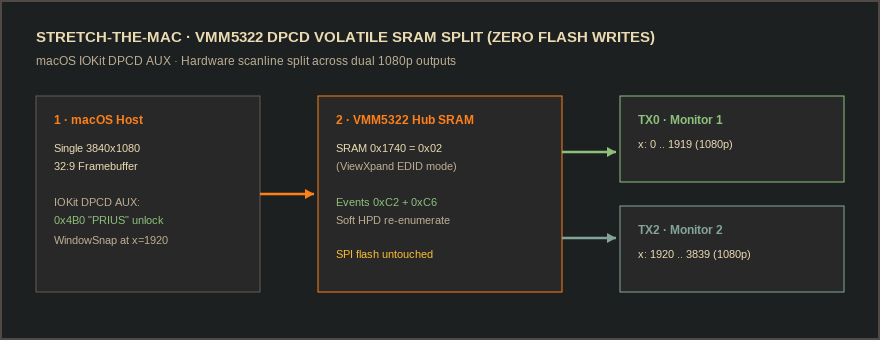
In ViewXpand mode, the hub doesn't need macOS to understand MST at all. Instead, the hub synthesizes a single 3840x1080 @ 60 Hz (32:9) Detailed Timing Descriptor in its upstream EDID buffer (0x1600), lets macOS drive one clean wide framebuffer, and slices every scanline in hardware right at pixel x = 1920 — sending 0..1919 to Monitor 1 (TX0) and 1920..3839 to Monitor 2 (TX2).
Three Bottlenecks Between Theory and a Usable Desk#
1. First rule of hardware humility: never touch SPI flash when volatile SRAM works#
Many dock "utilities" permanently overwrite external SPI flash — one power flicker or wrong checksum away from bricking a perfectly good dock on every operating system.
We drew a hard boundary in Sources/DockCore/: zero flash routines exist in the codebase. By unlocking the Synaptics DPCD Remote Control window (0x4B0..0x4FF, "PRIUS" enable sequence) through macOS IOKit (IODPDeviceReadDPCD / IODPDeviceWriteDPCD), we write 0x02 strictly to volatile hub SRAM address 0x1740. Unplug power from the dock, and it wakes up completely factory-stock.
2. Re-enumerating the link without crawling under the desk#
Writing 0x02 into SRAM 0x1740 changes the mode register, yet macOS keeps driving 1920x1080 because it only reads EDID on Hot-Plug Detect (HPD). Crawling under the desk to yank cables every morning wasn't going to cut it.
Probing the VMM5322 firmware event ring (0x0368..0x0387, write pointer 0x04A1) let us push two gentle software events — 0xC2 (rebuild upstream EDID) followed by 0xC6 (pulse software HPD) — causing macOS to blink once and wake up across all 3840x1080 pixels without touching a cable.
3. Teaching macOS where the physical center bezel lives#
Once the pixels worked, a practical UX problem appeared: because macOS sees one 32:9 screen, clicking Maximize or opening a centered dialog stretches your window straight across the plastic monitor gap at x = 1920.
So we added a tiny SwiftUI menu bar helper (StretchTheMac.app / WindowSnapController.swift) that treats x = 1920 as a real physical boundary — giving you drag-to-snap zones on both sides of the center bezel and 3-step AXUIElement keyboard shortcuts (Ctrl+Opt+Return maximizes cleanly on whichever 1920x1080 monitor currently holds focus).
Step-by-Step: Trying It on Your Own Mac + 40AN Dock#
Requires macOS 14.0+ and Xcode Command Line Tools (swift 6.0+). You can either run the zero-dependency Python script first to test your dock, or build the menu bar app.
Step 1: Clone and inspect your hub read-only#
git clone https://github.com/TinkeringDao/stretch-the-mac.git
cd stretch-the-mac
python3 lenovo_40an_vmm5322_split.py status
Step 2: Switch volatile SRAM to 3840x1080 ViewXpand split#
python3 lenovo_40an_vmm5322_split.py split-apply(To return to normal 1920x1080 pass-through at any time, run python3 lenovo_40an_vmm5322_split.py mirror.)
Step 3: Build the bezel-aware menu bar snapper and run self-tests#
make test
make
open dist/StretchTheMac.app
Working with what is already on your desk — rather than throwing hardware away because of a missing software handshake — is one of the quietest pleasures in engineering.